Flying for a few hours with a beeping vario can be annoying under certain circumstances. How can I set the vario so that it provides me with all the important information audibly without getting on my nerves too much?
Personally, I am particularly annoyed by the nervous beeping in strong thermals, but also by the constant sound when descending.
The basis for finding a setting that is as easy on the nerves as possible is: How do I fly, am I a normal cross-country flyer or the XC crack who wants to centre even the strongest climb, do I want to hear a strong sink finely in order to kick the accelerator depending on the strength of the sink?
The information I need during the flight can be briefly summarised as follows:
- I mostly fly in the Alps and the thermals are sometimes quite strong. As I don’t usually re-centre stronger thermals above 4 m/s, I don’t need the information as to whether it rises even more when circling.
- From a sink rate of 0.05 m/s, a short, low beep is enough to remind me to step on the accelerator.
- I’m not really interested in a stronger descent from 4 m/s, as I may already be in full speed anyway when crossing a valley.
- Not only in the lowlands, but also in the mountains you have a construction site on practically every XC flight where even the slightest climb should be reliably displayed. From a “climb” of 0 m/s, it can sometimes be worthwhile to insert a thermal search circle.
- To further reduce the annoyance factor, short tones are sufficient over the entire ascent and descent range.
- Sound frequencies higher than 1000 Hz also annoy me and I don’t need them.
The following settings result from the requirements:
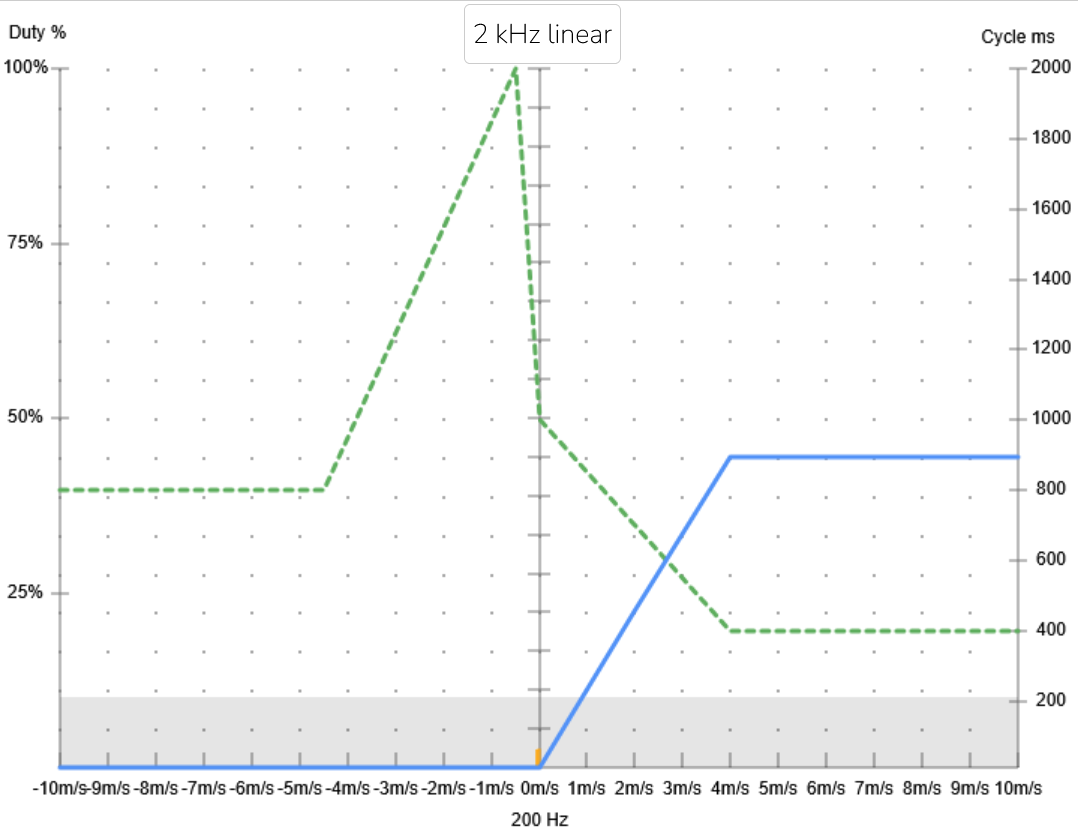
- The climb should be signalled audibly from a climb of 0 m/s and a descent of 0.05 m/s. In a small range of 0.04 m/s sink, the vario remains quiet.
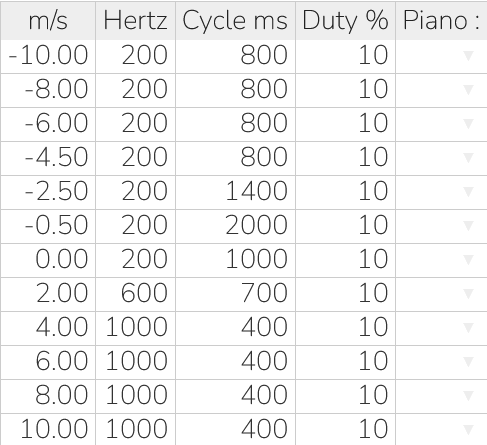
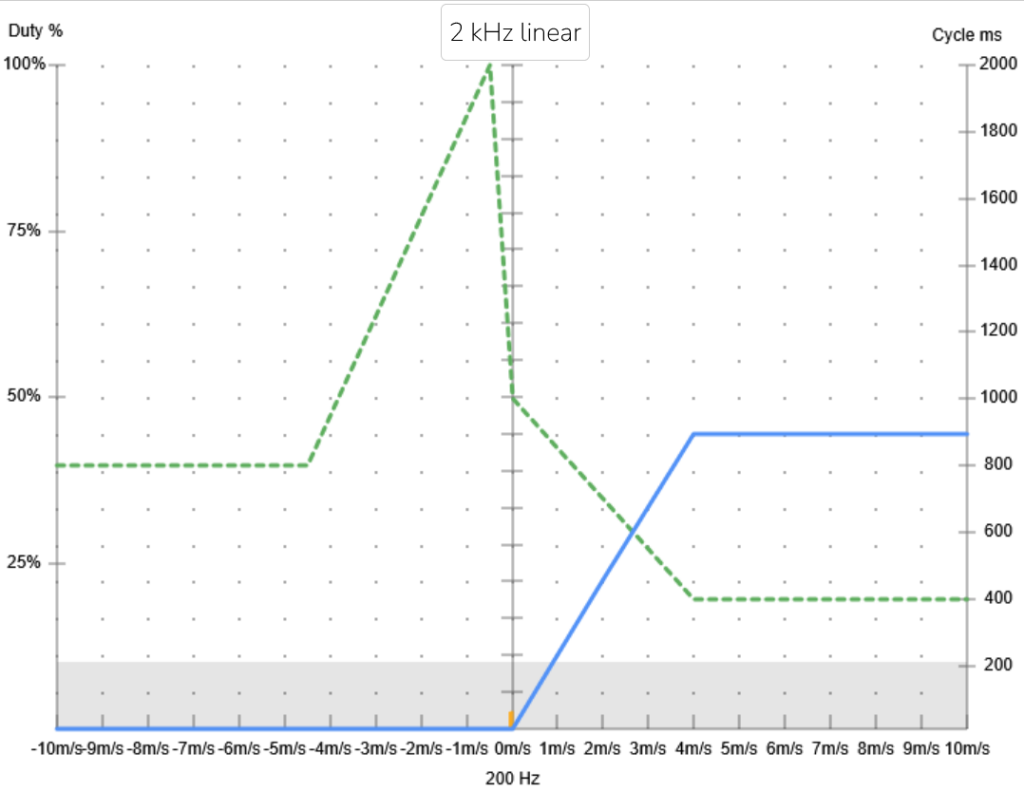
- When rising from 0.00 to 4.00 m/s, the tone frequency increases linearly from 200 to 1000 Hz ( Hertz parameter) and the interval between the tones decreases linearly from 1000 ms to 400 ms ( Cycle ms parameter).
- From a drop of 0.50 m/s to 4.50 m/s, the tone frequency remains constant at 200 Hz and the distance between the tones decreases linearly from 2000 ms to 800 ms.
- The on/off ratio is 10 % over the entire range (parameter Duty %). The tone length is sufficient for me to obtain the corresponding information on the air mass.
- So I only hear the rise and fall through the tone frequency and the distance between the tones, but that’s enough for me.
In the XC Tracer, the selected settings look as follows:
ClimbToneOnThreshold=0
ClimbToneOffThreshold=-0.01
SinkToneOnThreshold=-0.05
SinkToneOffThreshold=-0.04
tone=-10.00,200,800,10
tone=-8.00,200,800,10
tone=-6.00,200,800,10
tone=-4.50,200,800,10
tone=-2.50,200,1400,10
tone=-0.50,200,2000,10
tone=0.00,200,1000,10
tone=2.00,600,700,10
tone=4.00,1000,400,10
tone=6.00,1000,400,10
tone=8.00,1000,400,10
tone=10.00,1000,400,10
The settings can be tested and listened to on a PC on the XC Tracer website. Simply enter the above parameters in the text field.
Meaning of the parameters:
Hertz: Tone frequency, setting range from 200 to 2000 Hz
Cycle ms: Interval of the tones, setting range from 10 to 2000 ms. With a duty % of 100 %, this parameter has no meaning.
Duty %: On/off ratio of the sound. 0 % means no sound, 100 % means continuous sound.
I find the setting very easy on the nerves and flying is more fun. Which settings do you choose and why? Let me know in the comments. Thank you very much.